 Toolyn
PDF & Docs · in the tool list
A PDF editor for Windows that keeps your file safe
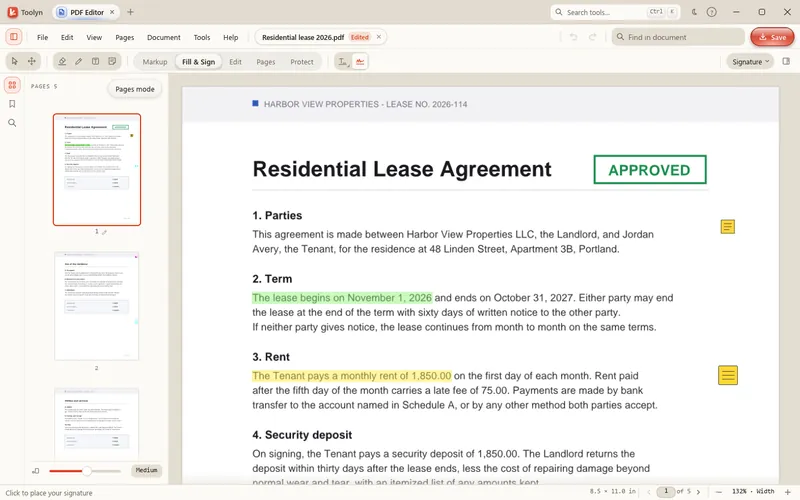
Toolyn's PDF Editor reads, marks up, fills in, signs and edits PDFs on your own PC. You can change a line of text in its original font, move and delete pages, black out text for good and add a password, with keyboard shortcuts that follow Acrobat's. Nothing is uploaded and there's no account to make.
- Works offline
- No uploads
- No account
- No subscription
How it works
4 steps, start to finish.
Open the PDF
Drop it on Toolyn or open it from Explorer. Toolyn can register as a PDF app, so you can make it your default in Windows Settings.
Pick a mode
Markup, Fill & Sign, Edit, Pages or Protect, along the top of the window.
Make your changes
Highlight, type into fields, sign, rewrite a line, or drag pages into a new order.
Save
Marks and form entries are added to the end of the file, so digital signatures already in it stay valid.
What it can do
PDF Editor, in detail.
Markup you can change later
Highlight, underline, strike out, pen, marker, rectangles, ellipses, clouds, arrows, text boxes, callouts, a typewriter and notes.
Fill & Sign
Type into form fields and tick boxes. Draw or type your signature and keep it for next time.
Edit the real text
Click a line and rewrite it in its original font, size and color, without a white box over it.
Pages
Reorder, rotate, duplicate, extract, crop and delete pages, insert blank ones or pages from other PDFs.
Redaction
Black out text for good: a redacted page is turned into a picture, so what was under the box is gone.
Passwords
Add a password with AES-256 encryption, or remove one you know.
Crash-safe
Unsaved changes are written to a journal two seconds after you stop, and come back after a crash.
Print
Print from Toolyn's own print dialog.
Questions
PDF Editor: plain answers.
Does the PDF Editor upload my files?
No. Opening, editing, signing and saving all happen on your PC. Toolyn has no account and no cloud storage.
Will editing break a digital signature?
Marks, notes and form entries are added to the end of the file, which keeps existing signatures valid. Moving or deleting pages, redacting and changing the password rewrite the whole file, so do those before anyone signs.
Can I fill in a PDF that has no form fields?
Yes. Use the Typewriter or a text box in Markup to type anywhere on the page. PDFs with standard form fields can be filled in directly in Fill & Sign.
Can it be my default PDF app?
Yes. Toolyn registers as a PDF app and opens the Windows Settings page where you choose it as the default.
Does it work on Windows 10?
Yes, on Windows 10 and Windows 11, 64-bit.
In the same app
Related tools, no extra install.
PDF Editor and 68 more tools.
One app for Windows, paid once, with every update included. Nothing you open in it is uploaded.