 Toolyn
Video · in the tool list
A video editor for Windows that writes the captions for you
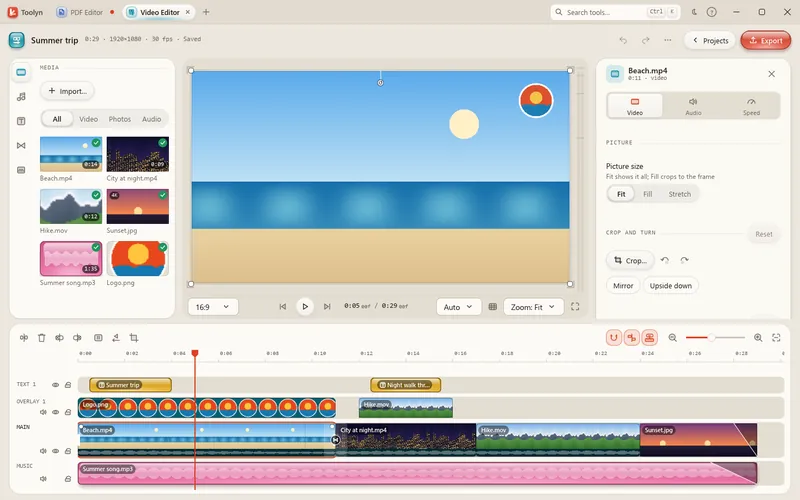
Drop in videos, photos and music, cut them together on a magnetic timeline and export one MP4. Toolyn adds titles, transitions, speed changes and a voice-over, and makes captions on your own PC, a word lighting up as it's said. Your project saves itself a second after every change.
- Works offline
- No uploads
- No account
- No subscription
How it works
4 steps, start to finish.
Drop in your media
Videos (MP4, MOV, MKV, WebM, AVI, M4V), photos and music go into the library and onto the timeline.
Cut on the timeline
Trim, split, close gaps and snap. Text and music stay in sync with the clip they belong to.
Add the finishing touches
Titles, transitions, speed, captions and a voice-over, each from the panel on the left.
Export an MP4
720p to 4K at 24 to 60 fps, in Smaller, Balanced or Best quality.
What it can do
Video Editor, in detail.
Magnetic timeline
Main, overlay, text, caption, music and voice tracks, with 200 steps of undo.
Text and titles
Ready-made styles, any installed font, outlines, shadows and boxes. Emoji in color, and Arabic, Persian and Hebrew right to left.
Transitions
Dissolve, Dip to black and Dip to white, from 0.1 to 2 seconds.
Speed
From 0.1× to 100×, with Keep pitch so voices sound natural. Reverse, freeze, crop and picture in picture too.
Automatic captions
Made on your PC in 15 languages, or let it detect the language. Burn them in or save an SRT file.
Sound
Reduce noise, clean up a voice, lower the music under speech, record a voice-over with a count-in, or use a Windows voice.
Any shape
16:9, 9:16, 1:1, 4:5, 4:3 or 21:9, or the shape of your first video.
Fast export
MP4 with H.264 and AAC, using your graphics card's encoder when it can.
Export and captions use FFmpeg, a free helper Toolyn installs for you with one click; captions need its full build. The speech model for captions downloads once, when you ask for it: from 78 MB (tiny) to 1.5 GB (medium).
Questions
Video Editor: plain answers.
Are the captions made online?
No. Captions are made on your PC with a speech model that downloads once, the first time you use them. Your video isn't sent anywhere.
Which files can I import?
Video: MP4, MOV, MKV, WebM, AVI and M4V. Photos: JPG, PNG, WebP, BMP, TIFF, GIF, HEIC and AVIF. Audio: MP3, WAV, M4A, AAC, FLAC, OGG and Opus.
What does it export?
One MP4 (H.264 video, AAC sound) at 720p, 1080p, 1440p or 4K, at 24, 25, 29.97, 30, 50 or 60 fps.
Will I lose work if it crashes?
Unlikely. The project saves itself a second after every change.
Does it work on Windows 10?
Yes, on Windows 10 and Windows 11, 64-bit.
In the same app
Related tools, no extra install.
Video Editor and 68 more tools.
One app for Windows, paid once, with every update included. Nothing you open in it is uploaded.