 Toolyn
Capture · in the tool list
A screen recorder for Windows, from quick clips to polished demos
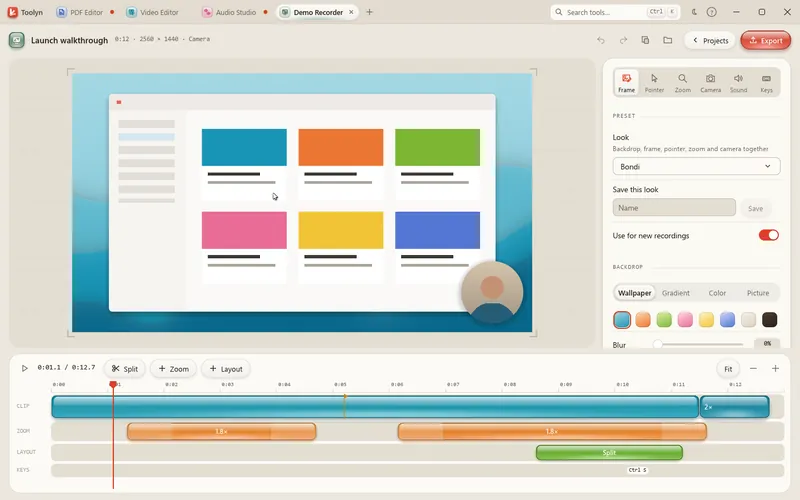
Toolyn has two recorders. Record Screen captures a display, a window or an area to an MP4, with your microphone and the sound the PC plays. Demo Recorder is for product demos: it zooms in where you click, smooths the pointer and puts the recording on a backdrop with a camera bubble, all of which you can change until you export.
- Works offline
- No uploads
- No account
- No subscription
How it works
4 steps, start to finish.
Pick what to record
A whole display, one window or an area you drag out.
Record
Start after a three-second countdown if you like. Ctrl+Alt+R stops the recording from any app.
Polish it (Demo Recorder)
Move, resize or remove the automatic zooms on the timeline, and pick a backdrop and a camera layout.
Export
Record Screen saves MP4 or MOV. Demo Recorder exports MP4, GIF or ProRes, or copies the video to the clipboard.
What it can do
Screen Recorder, in detail.
Sound from both sides
Any microphone, plus “Record what the PC plays”, mixed into one track.
Sizes and frame rates
Record Screen: full size, 1440p, 1080p or 720p, at 15, 30 or 60 fps.
Clicks you can see
Show or hide the pointer, and highlight clicks with a ring.
Automatic zooms
Demo Recorder zooms in on clicks and typing, easing in and out. Turn either off.
A pointer worth watching
Drawn sharp at any size, smoothed, and hidden while you type.
Backdrop and shapes
Wallpaper, gradient, solid color or your picture, in 16:9, 9:16, 1:1, 4:3, 3:4 or 4:5.
Camera bubble and layouts
Camera in a corner, side by side, camera only or screen only, switched on the timeline.
Export up to 4K
Demo Recorder: 720p, 1080p, 1440p or 4K at 24, 30 or 60 fps. GIFs go up to 1080p.
Both recorders use FFmpeg, a free helper Toolyn installs for you with one click. Demo Recorder notes which keys went down for its zooms and key caps, never what you type.
Questions
Screen Recorder: plain answers.
Can it record the sound my PC plays?
Yes. “Record what the PC plays” is on by default and is mixed with your microphone.
Can I record just one window?
Yes. Both recorders can record a display, a single window or an area.
Does Demo Recorder log what I type?
No. It stores that a key went down, so it can zoom in while you type. Only shortcuts keep their key names, for the key caps.
Can I make a GIF?
Demo Recorder exports GIF at up to 1080p and 10 to 30 fps. Record Screen saves MP4 or MOV.
How do I stop a recording?
Press Ctrl+Alt+R from any app, or use the stop button in Toolyn.
In the same app
Related tools, no extra install.
Screen Recorder and 68 more tools.
One app for Windows, paid once, with every update included. Nothing you open in it is uploaded.