 Toolyn
System · in the tool list
A PC optimizer for Windows that shows its work
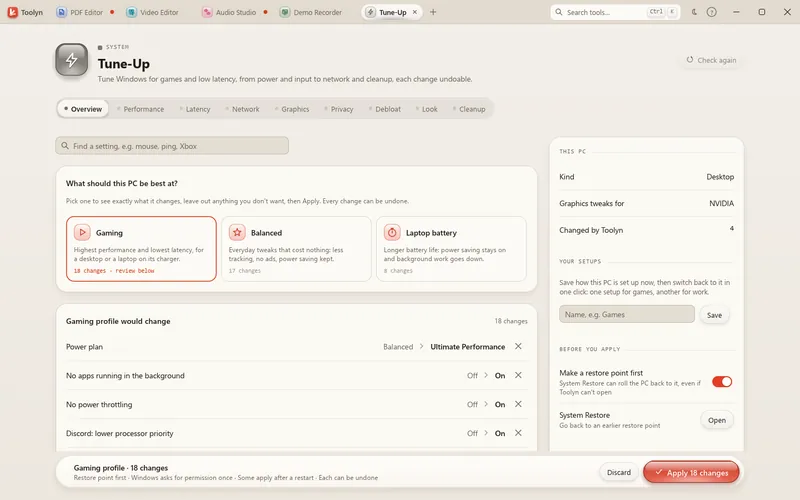
Tune-Up sets Windows up for games, low latency or a longer battery, and nothing changes until you press Apply. Every setting says what it does, what it's good for and whether it needs administrator rights. The old value is saved before anything is written, so every change has its own Undo.
- Works offline
- No uploads
- No account
- No subscription
How it works
4 steps, start to finish.
Pick a goal
Gaming, Balanced or Laptop battery.
Read the list
Each change shows its value before and after. Leave out anything you don't want.
Apply
Make a System Restore point first if you like. Changes that need administrator rights ask once for the whole batch.
Undo any time
Undo one change, or Restore everything from the Overview.
What it can do
Tune-Up, in detail.
Every layer
Performance, Latency, Network, Graphics, Privacy, Debloat, Look and Cleanup, with a search across all of them.
Performance
Power plan (up to Ultimate Performance), Game Mode, no background game recording, full power while plugged in.
Latency
Global timer requests, no mouse acceleration, no USB selective suspend.
Network
Send small packets right away, no network throttling during media, a faster DNS (Cloudflare, Google or Quad9).
Privacy and debloat
Least diagnostic data, no advertising ID, no tips and ads, and services and Store apps you don't use.
Stays tuned
When Windows puts some of your changes back, often after an update, Tune-Up says so and lets you apply them again.
Tune-Up never switches off Microsoft Defender, the firewall, User Account Control, Windows Update, SmartScreen, Memory Integrity or the processor's security mitigations.
Questions
Tune-Up: plain answers.
Can Tune-Up break Windows?
Tune-Up changes nothing until you press Apply. It saves each old value first, makes a System Restore point unless you switch that off, and lets you undo any change or restore everything.
Does it need administrator rights?
Only for the settings marked Admin. Those are applied together, so Windows asks once per Apply.
What happens after a Windows update?
If an update puts some of your changes back, Tune-Up tells you how many and offers to apply them again.
Does it touch security settings?
No. Defender, the firewall, User Account Control, Windows Update, SmartScreen, Memory Integrity and the processor's security mitigations are off limits.
In the same app
Related tools, no extra install.
Tune-Up and 68 more tools.
One app for Windows, paid once, with every update included. Nothing you open in it is uploaded.